
Boardroom AV Setup: What a Reliable Meeting Room Actually Needs
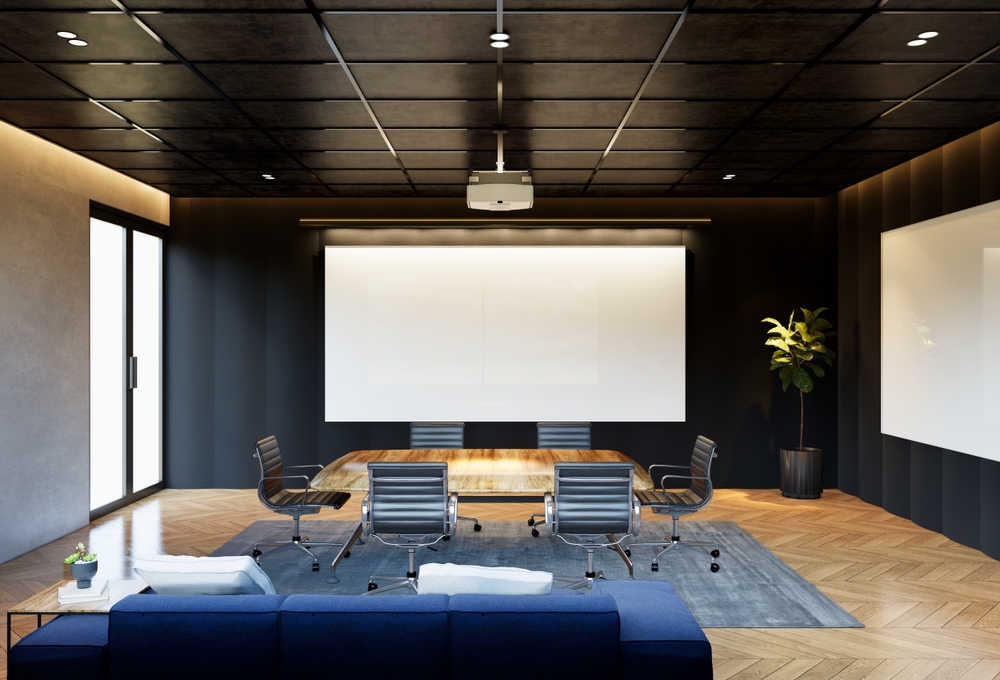
A reliable meeting room needs five things working together: a display sized to the room, a camera with the right field of view, microphones matched to the seating, clear speakers, and a one-touch way to start the call — all on a network that doesn’t drop. Get those right and meetings start on time. Get one wrong and every call opens with “can you hear me?”
Most boardroom problems aren’t exotic. They’re a projector that’s too dim for a room with windows, a webcam clipped to a screen ten feet from the far chair, or mics that pick up the HVAC louder than the person talking. This guide walks through what actually matters, how to size it to your space, and when a simple all-in-one is genuinely enough.
What is AV installation, really?
AV installation is the design, wiring, mounting and configuration of the audio and video gear a room needs to work as one system — not a pile of parts you plug in and hope for. In a meeting room that means the display or projector, the conferencing camera, the microphones and speakers, the room PC or appliance running Teams or Zoom, the control panel, and the cabling and network behind the wall that ties it together.
The word “installation” carries more weight than people expect. A camera and a good microphone can each be excellent and still deliver a bad meeting if they’re aimed wrong, wired badly, or fighting the room’s acoustics. Installation is the part that turns components into a room that behaves the same way every Monday morning.
What are the benefits of AV installation done properly?
The benefit is boring, and that’s the point: meetings start on time and nobody thinks about the technology. Here’s the honest before-and-after.
Before a proper setup: someone arrives early to “get it working.” A laptop gets passed around for the camera angle. Remote people are asked to repeat themselves. The screen shows the wrong input. Ten minutes evaporate before the actual conversation starts — every single meeting, multiplied across every person in the room.
After a proper setup: you walk in, tap “join,” and you’re in the call. The far side hears everyone clearly because the mics cover the table. Remote participants can see faces, not silhouettes against a window. The room looks the same to the next team that books it.
That reliability is the real return. A room that fails even occasionally isn’t “mostly fine” — it’s a room people stop trusting, so they crowd around a laptop instead, and the investment sits unused.
The reliable meeting-room AV checklist
Use this to audit an existing room or spec a new one. It’s grouped so you can see where the weak link usually is.
Display
- Display or projector sized so text is readable from the farthest seat (roughly: screen height ≥ 1/6 the distance to the back chair)
- Bright enough for the room’s actual lighting — a dim projector dies against windows
- Single, obvious source — no guessing which input or remote
- Dual displays only where the workflow needs content plus faces
Audio
- Microphones that cover every seat — ceiling mics for larger rooms, table mics for smaller
- Speakers loud and clear enough for the far end, positioned so they don’t feed back into the mics
- Some acoustic treatment (or a carpet, soft furnishings, panels) so voices don’t echo
- Echo cancellation and noise handling configured, not just switched on
Camera
- Field of view that fits the room — a wide huddle-room lens looks wrong in a long boardroom
- Mounted at a natural eye line, not craning up or down at people
- Auto-framing or a second camera for larger rooms so remote people see who’s talking
Control
- One-touch join — tap the room name, you’re in the meeting
- A room PC or dedicated appliance (Teams Rooms / Zoom Rooms), not a borrowed laptop
- Simple control panel for volume, source and hang-up
- Optional scheduling panel outside the door showing free/busy
Network
- Wired connection for the room system — Wi-Fi is a last resort for video calls
- Enough bandwidth and QoS so the call doesn’t stutter when the office is busy
- Clean, labelled cable management so a fault takes minutes to find, not hours
If your room fails three or more of these, you don’t have a gear problem — you have a design problem, and adding another gadget won’t fix it.
How do I size the AV to the room?
The single most common mistake is buying components sized for the wrong room. A camera and mic that are perfect for a four-person huddle room will fail in a twelve-seat boardroom, and vice versa. Match the gear to the space first, then pick brands.
| Room type | Typical seats | Display | Camera | Audio |
|---|---|---|---|---|
| Huddle room | 2–5 | Single 55″ display | Wide-FOV all-in-one bar | Bar’s built-in mics |
| Medium meeting room | 6–10 | 65″–75″ display | Conferencing camera with auto-framing | Bar or 1–2 table/ceiling mics |
| Boardroom / exec | 10–20+ | 85″+ or dual displays / projector | Camera(s) with speaker tracking | Ceiling mic array + designed speakers |
Two rules of thumb worth remembering. For the display, the farthest viewer should sit no more than about six times the screen height away, or on-screen text and shared documents get hard to read. For audio, coverage is everything — one mic in the middle of a long table leaves the ends muffled, which is why boardrooms move to ceiling arrays.
Rooms with lots of glass, hard walls and no soft surfaces need acoustic help regardless of size. Great mics can’t un-echo a reverberant room; they just capture the echo more clearly.
How much does AV installation cost?
Honest answer: it depends on the room, and anyone quoting a flat number without seeing the space is guessing. Cost is driven by the room, not a price list. Here are the factors that actually move it:
- Room size and seat count — bigger rooms need bigger displays, more mic coverage and often a second camera
- All-in-one vs designed system — a single conferencing bar is a fraction of a ceiling-mic-and-speaker design
- Display choice — a large commercial display or a bright projector-and-screen setup is a real line item
- Camera count and tracking — speaker-tracking and multi-camera rooms cost more than a fixed lens
- Acoustic treatment — panels and their install, where the room needs them
- Cabling and structured wiring — running clean cable inside finished walls takes labour
- Control and scheduling — a touch panel and room-scheduling display add hardware and programming
- Standardization — matching several rooms to one layout costs more upfront but saves for years in support and training
As a rough shape only: a tidy huddle-room fit-out is a modest project, a mid-size room with a proper camera and mics is a step up, and a full boardroom with ceiling audio, dual displays and control is a meaningfully larger investment. The work is priced by scope — room size and seat count, display and camera choices, mic coverage, acoustic treatment, cabling and control programming — so a walk-through of the actual room is what gives you a real number. The related read below on system cost thinking may help you frame a budget conversation internally.
The honest tradeoff: when a soundbar-style all-in-one is enough
Not every room needs a designed system, and it would be dishonest to pretend otherwise.
An all-in-one conferencing bar is genuinely enough when:
- The room is a true huddle space — four or five people, one short table
- Everyone sits within the bar’s mic pickup and camera field of view
- You want the simplest possible setup and support footprint
- The room isn’t acoustically hostile (no giant glass wall bouncing sound around)
In that scenario a good all-in-one mounted under the display, on a wired connection, will out-perform an over-designed system nobody configured properly. Buy the bar, mount it well, hard-wire it, and move on.
A designed system earns its cost when:
- The room seats more than the bar can cover — voices at the far end drop out
- It’s a boardroom or executive room where a failed call has a real cost
- You’re standardizing several rooms so every space works identically and support is simple
- The room fights you acoustically and needs distributed mics, speakers and treatment
The line isn’t about prestige, it’s about coverage and consequence. Once a single bar can’t reach every seat, or a dropped meeting genuinely hurts, the design work pays for itself. Below that line, keep it simple.
Does the platform (Teams vs Zoom) change the room design?
It changes the appliance and the join experience more than the room’s bones. The display, camera, mics, speakers, network and acoustics are largely the same either way — what differs is the room PC or certified appliance and how one-touch join is configured. If your organization is standardizing on one platform, that’s worth deciding before you buy the room compute. Our companion guide on Microsoft Teams Rooms vs Zoom Rooms breaks down that choice in detail.
Frequently asked questions
What is AV installation for a meeting room?
It’s the full job of designing, wiring, mounting and configuring the display, camera, microphones, speakers, room compute and control so the room works as one reliable system. It’s the difference between a box of good components and a room that starts on time every day. Proper installation also handles the network and cable management that most failures trace back to.
What are the main benefits of professional AV installation?
Meetings start on time, remote participants are heard and seen clearly, and staff stop troubleshooting technology instead of doing their jobs. A room that behaves identically every time gets used and trusted, so the investment actually returns value. The quieter benefit is support: a well-installed, labelled system is fast to diagnose when something does go wrong.
How much does audio video installation cost?
It varies with room size, whether you use an all-in-one or a designed system, the display, camera count, acoustic needs, cabling and control — so a fixed number without seeing the room isn’t honest. A small huddle room is a modest project; a full boardroom with ceiling audio and control is a larger one. It’s priced by scope (rooms, seats, cameras, mic points, cabling and programming), and a site walk-through of the specific room is what gives you a real figure.
Can I just use a webcam and a laptop instead?
For a tiny huddle room, sometimes — but it breaks down fast. A laptop webcam and mic can’t cover a table of eight, the angle is usually wrong, and every meeting depends on someone remembering the setup. Once more than a few people share the room, a dedicated camera, distributed mics and a room appliance are what make it reliable.
Do I need acoustic treatment in a meeting room?
If the room has hard floors, bare walls and lots of glass, almost certainly yes. Great microphones capture echo just as clearly as speech, so a reverberant room sounds bad no matter how good the gear is. Even modest treatment — panels, a rug, soft furnishings — noticeably cleans up how the far end hears you.
How long does a boardroom AV install take?
It depends on the scope and whether cabling runs inside finished walls, which is the slow part. A simple huddle-room bar can go in quickly; a full boardroom with ceiling audio, structured wiring and control programming is a multi-day project. We scope the timeline against the specific room during the consultation, so you get a realistic schedule before any work starts.
When you’re ready to talk specifics, our boardroom and meeting room AV setup service covers design, installation and standardizing rooms across an office in Brampton and the wider GTA. Monitoring options can be arranged depending on the property and requirements — we’ll cover this during your consultation.
Ready to plan your project?
Tell us what you want to build, fix or upgrade — a Techspirit Solutions specialist will help.