
Ajax Alarm Systems Explained: How Modern Smart Alarms Work
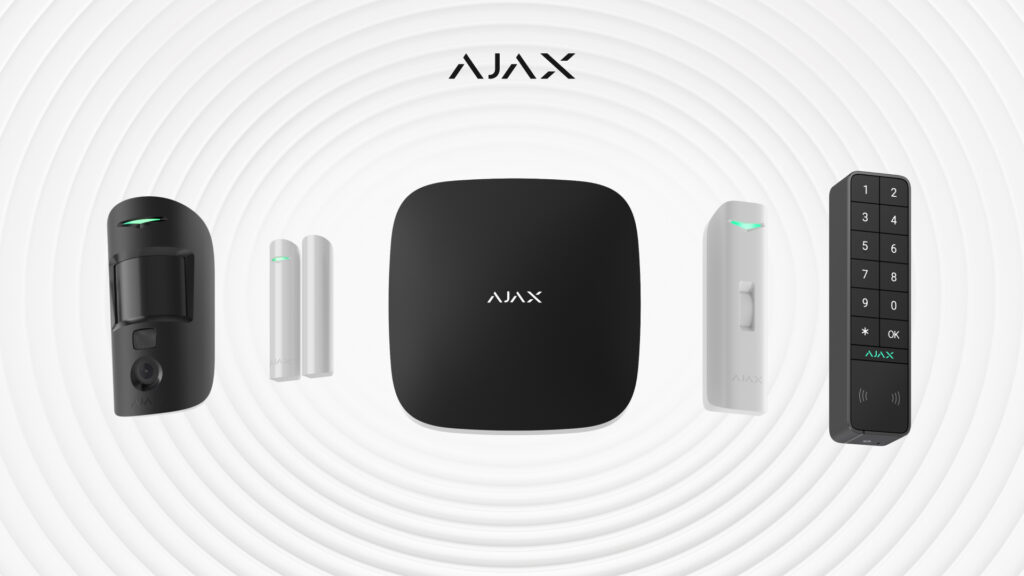
A modern smart alarm like Ajax is an app-controlled, wireless security system: a central hub talks to battery-powered sensors over encrypted mesh radio, arms and disarms from your phone, and — critically — sends a short burst of photos the moment something trips, so you see what happened instead of guessing. That last part is the real leap over an old keypad panel.
If you’ve only ever lived with a wired box on the wall and a beige keypad by the door, the difference is bigger than it looks. Below is how these systems actually work, what components you need, and how to tell a serious setup from a toy — written from what we see installing them.
How is an app-based smart alarm different from an old wired panel?
Old alarm panels were built around a wired keypad and a phone line. Sensors ran on cable back to a central box, you armed it with a code, and if it tripped, a siren went off. You had no idea why until you drove home or called someone.
A smart alarm flips that. The keypad becomes optional and your phone becomes the control panel. Here’s what changes in practice:
- App control. Arm, disarm, and check status from anywhere. No walking to a keypad, no shared codes taped inside a cupboard.
- Wireless sensors. Detectors run on batteries and talk to the hub over radio, so there’s no opening walls to run cable. That makes retrofits and condos realistic.
- Long battery life. Ajax detectors run for years on their sealed batteries — check the spec sheet for the exact detector you choose — and the app warns you long before one dies.
- Tamper detection. Pry a sensor off the wall or open its housing and it reports the tamper immediately — not just when the zone triggers.
- Jamming detection. The hub watches the radio band and flags deliberate signal jamming, a known weakness of cheap wireless kits.
- Photo verification. Motion detectors with a built-in camera capture a series of images the instant they trigger. Your phone shows the room, so you can tell a burglar from your dog before you panic or call anyone.
- Mesh radio and supervision. Sensors don’t just fire and forget; they check in with the hub on a schedule, so a dead or removed sensor gets noticed.
Modern smart alarm vs traditional panel
| What matters | Traditional wired panel | Modern smart alarm (Ajax) |
|---|---|---|
| Control | Keypad + code at the door | Phone app, from anywhere |
| Sensors | Wired, walls opened to install | Wireless, battery-powered |
| When it trips | Siren; you don’t know why | Push alert + photos of the zone |
| Sensor removed/tampered | Often silent until zone fires | Reported instantly |
| Wireless jamming | Not detected | Actively detected |
| Health of the system | Manual testing | Sensors auto-report status |
| Verify a real event | Drive home or phone a person | Look at the app in seconds |
| Moving home | Wiring stays behind | System comes with you |
What are the benefits of a home alarm system today?
The old promise of an alarm was deterrence and a loud noise. That still holds — a visible, armed system discourages opportunists. But a modern system earns its keep in the day-to-day, not just the break-in you hope never comes:
- You actually arm it. The number-one failure of old panels is that people stop using them after enough false alarms. App control and meaningful alerts fix the habit.
- Fewer false-alarm panics. A 2 a.m. alert comes with a picture, so you can see it’s a pet, a delivery, or an open window — and go back to sleep.
- Awareness, not just alarms. Leak, smoke, and panic devices ride on the same hub, so one app watches for more than break-ins.
- A record of what happened. Every event — armed, disarmed, triggered, restored — is logged with a timestamp and often an image.
If you’re weighing an alarm against cameras as a first investment, our breakdown of security camera cost and where to place cameras covers how the two work together and where each one pulls its weight.
What components make up an Ajax alarm system?
You don’t need all of these. A small home might run a hub and four devices; a larger property layers on more. Every piece is a module on one system, chosen for your floor plan.
Component checklist:
- Hub — the brain. Connects to your internet (and usually a cellular backup), runs the radio mesh, and pushes alerts.
- Motion detectors — the workhorses. Get the camera-equipped version (MotionCam) where photo verification matters most: main hallways, back doors, the room with the valuables.
- Door/window contacts — sensors that report the moment a door or window opens.
- Glass-break detectors — listen for the specific frequency of breaking glass, useful on large windows and patio doors.
- Keypad — optional. Some people still want a wall keypad for guests or a cleaner; it’s a choice, not a requirement.
- Sirens — indoor and outdoor. The outdoor siren is the visible deterrent; the indoor one drives an intruder out.
- Cameras — full CCTV cameras that integrate with the alarm, so an alert takes you straight to live or recorded video of the zone that tripped.
- Extras — panic buttons, leak (water) detectors, and smoke detectors on the same hub and app.
Why is camera verification the feature that actually matters?
If you take one thing from this article, take this. On an old system, a tripped alarm was a question mark — a real break-in, a spider on a sensor, or the cat? You couldn’t know without eyes on the place.
Camera verification answers the question in seconds. A motion detector with a built-in camera captures a short series of still images the instant it triggers and sends them with the alert. You open your phone and see the room. That kills the anxiety of a mystery alarm, lets you decide fast, and — where a professionally-arranged response is involved — turns a maybe into a confirmed event.
It’s also the honest cure for false alarms. Most systems that get switched off die from crying wolf. When every alert comes with a picture, the alerts stay believable — and a believable alarm is one you keep armed.
How do I choose a smart alarm — and what should I look for?
Once you’re past the marketing, a good system comes down to a few things:
- Encrypted, two-way radio with supervision. Sensors should check in and report tamper and low battery, not just fire once.
- Jamming and tamper detection. Non-negotiable on a wireless system. If a spec sheet is silent on these, that’s your answer.
- A cellular backup path. Wi-Fi alone means a cut internet line disables the alarm. A cellular fallback keeps it reporting.
- Real photo verification, not a doorbell camera bolted on afterward. It should be built into the alarm’s own detectors.
- Room to grow. Leak, smoke, panic, and cameras on the same hub, so you’re not buying a second system later.
- Who installs and stands behind it. Placement and configuration decide whether the system is reliable or a nuisance. That’s a design decision, not a box you unpack.
Alarm system installation guide: DIY kit vs professional design
Here’s the part most companies won’t say plainly. For a small, simple home, a basic DIY smart-alarm kit is genuinely fine. A condo or a two-bedroom with a hub, a couple of door contacts, and one or two motion detectors is well within reach of a careful homeowner. If that’s you, buy good gear and enjoy it.
Professional design earns its cost when the job stops being simple:
- Larger or multi-level properties, where detector placement, dead radio spots, and coverage overlap take real planning.
- Integration — folding the alarm together with cameras, access control, or a wider smart-home system so it all works as one.
- Reliability that has to hold. Signal testing, sensible zones, pet-immune placement, and a clean install separate an alarm you trust from one you mute.
A DIY kit mounted in the wrong spots and set too sensitive is worse than no upgrade at all, because you’ll stop trusting it. If the design matters, that’s what our smart alarm systems installation service handles — one accountable team designing, installing, and configuring the whole thing.
Do smart alarms come with monitoring?
This is where honesty matters more than the sales pitch. Self-monitoring through the app is genuinely enough for many homes. With push alerts and photo verification, you are the monitoring — you see the event, you see the picture, and you decide. For a lot of families, that’s the whole job done.
Professionally-arranged monitoring makes sense when you want a third party watching around the clock, or when you’re away often enough that you can’t be the one to respond. Monitoring options can be arranged depending on the property and requirements — we’ll cover this during your consultation.
Frequently asked questions
How do I troubleshoot an alarm system that keeps giving false alarms?
Start with placement and settings, not the hardware. Most false alarms come from a motion detector aimed at a heat source, a vent, or a pet’s path, or set too sensitive for the room. Check the app’s event log to see exactly which detector is tripping and when — the pattern usually points straight at the cause. On a smart system, you can adjust sensitivity and re-aim a detector without tools; if it persists, the device may need repositioning during a service visit.
What happens when my Ajax alarm triggers?
You know immediately, and you know why. The app tells you which detector tripped, and camera-equipped detectors send a short series of images with the alert. You can tell a break-in from a pet or an open window before deciding what to do — arm the siren, ignore it, or call for help.
Will a wireless alarm work in a condo or a rental?
Yes. Because the sensors are wireless and battery-powered, there’s no opening walls or running cable, so most condos and many rentals are straightforward. The hub connects to your internet, the detectors mount cleanly, and the whole system moves with you if you leave.
Are smart alarms safe from hackers and signal jamming?
A well-designed system defends against both. Ajax uses encrypted two-way radio, so signals can’t be easily read or spoofed, and the hub actively detects jamming and reports it as an event rather than going silent. A cellular backup path also keeps the alarm reporting if someone cuts the internet.
Do I still need a keypad on the wall?
Not usually. The app is your control panel for arming, disarming, and checking status. A physical keypad is worth adding if you want a simple way for guests, kids, or a cleaner to arm and disarm without the app — it’s a preference, not a requirement.
Can you replace my old wired alarm panel with a smart one?
Often, yes. If your existing wired sensors are in good condition, integration modules can bring them into a new smart hub; if not, a clean wireless replacement is straightforward. What’s worth keeping is best assessed on site before anything is ordered.
When you’re ready to move from planning to a designed system, we’re an Authorized Ajax Systems Partner based in Brampton and serving the GTA — book a free smart alarm consultation and we’ll design it around your floor plan.
Ready to plan your project?
Tell us what you want to build, fix or upgrade — a Techspirit Solutions specialist will help.